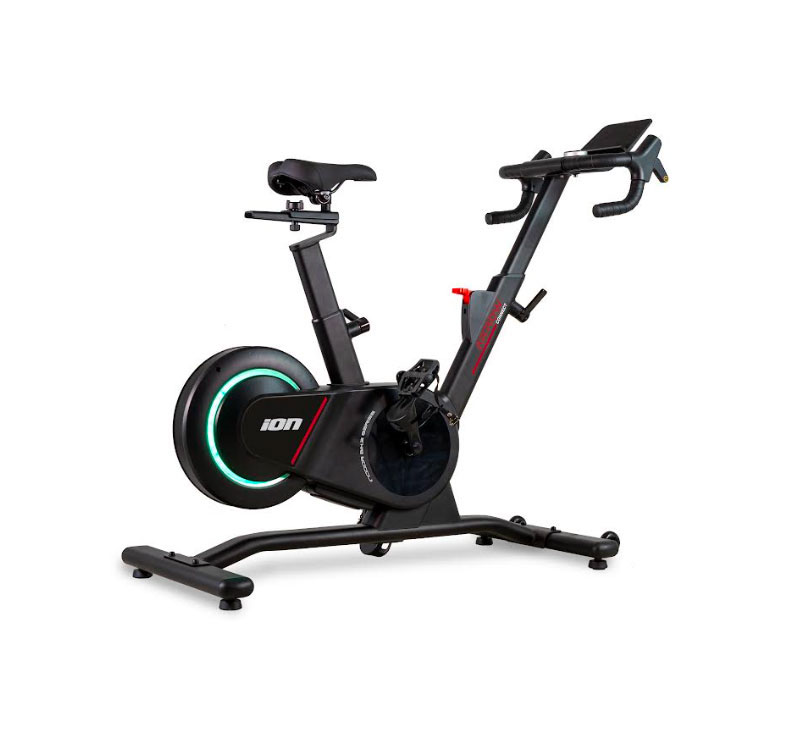
The BH Fitness Arrow Connect smart bike now has a practical QZ compatibility confirmation. In a private support exchange, the owner was using QZ on an iPhone and Zwift on an iPad. QZ was already connecting correctly to the bike, and the rider reported that resistance worked in the setup.
The remaining question was the Zwift gear workflow. After Roberto discussed how Zwift pairs virtual devices and the rider toggled the Get Gears from Zwift option a couple of times, the user replied: “It is working now.” That makes the Arrow Connect a useful under-documented QZ case for riders who want to bridge a Bluetooth smart bike into Zwift-style training workflows.
Table of Contents
Compatibility summary
| Equipment | BH Fitness Arrow Connect |
| Device type | Bluetooth smart indoor bike |
| QZ connection | Confirmed: the bike connected correctly to QZ in the user setup |
| Metrics evidenced | Bike data was available through QZ; the setup centered on power/cadence style pairing to Zwift through the virtual Wahoo KICKR profile |
| Resistance / gears | Resistance was reported working. The immediate gear-workflow issue was resolved after toggling Get Gears from Zwift; use model-specific testing for shift-paddle behavior. |
| Zwift | Reported workflow: QZ on iPhone, Zwift on iPad, pairing QZ as the virtual Wahoo KICKR source for power/cadence/resistance |
| MyWhoosh / Rouvy / Peloton | QZ can bridge compatible bike metrics to other training apps, but this confirmation was specifically about the QZ + Zwift workflow |
| Garmin / Strava / Apple Health / Google Health | QZ includes workout and export integrations such as Apple Health / HealthKit, Garmin Connect workflows, Strava upload, and Android health-platform support such as Google Health / Health Connect where configured; these were not the specific focus of this Arrow Connect confirmation |
| Confidence | High for QZ connection and the reported Zwift gear-workflow fix; cautious for untested app/control combinations |
Suggested QZ setup notes for the Arrow Connect
- Wake the Arrow Connect before scanning so its Bluetooth services are advertising.
- Open QZ first and confirm that the bike connects and shows values before launching Zwift.
- In Zwift, pair the virtual device exposed by QZ for the cycling data you need, such as power and cadence.
- If the gear workflow does not behave as expected, check the QZ option Get Gears from Zwift and restart/toggle the setup as needed.
- For shift-paddle behavior, test both directions in QZ and in the target training app because Zwift controller pairing has app-side limitations for non-Zwift hardware.
What QZ adds
QZ works as an equipment/app bridge for indoor bikes, treadmills, ellipticals, rowers and other fitness machines. For compatible Bluetooth bikes, QZ can read the equipment metrics and expose a virtual training-device profile to apps such as Zwift, MyWhoosh, Rouvy, Peloton and others, depending on the app and platform.
QZ also adds training and sync features around the equipment connection: workout recording, app bridge options, and integrations such as Apple Health / HealthKit, Garmin Connect workflows, Strava upload, and Android health-platform support such as Google Health / Health Connect where available and configured.
Troubleshooting
If the Arrow Connect connects but gears or resistance do not behave as expected, first verify the virtual-device pairing in Zwift and the Get Gears from Zwift setting in QZ. If something does not work as expected, send an email to Roberto.viola83@gmail.com and Roberto will help you check the setup.
Want to use your BH Fitness Arrow Connect with more training apps? Download QZ and learn more at qzfitness.com.